
How to Use Your Phone on a Cruise: Cellular, Ship
Wi-Fi and e-SIM plans explained.
Cruising is a great and popular way to travel to alluring destinations while enjoying the convenience of a floating hotel, dining, and entertainment venue. However, spending time at sea and arriving at varying countries/cities each day presents unique challenges for travelers who cannot completely unplug from technology.
This EZ Guide to Using Your Phone on a Cruise explains the three most common ways to use your phone on a cruise, and what to consider when choosing the best plan for you. You can also watch our YouTube Video!
1. Use Cellular Phone Service on a Cruise
Cellular service is provided over a cellular network (e.g. 5G, LTE, Cellular at Sea, GSM-2G) by a provider or carrier (e.g. ATT, T-Mobile, Verizon, Cruise Ship, FLOW, DIGICEL).
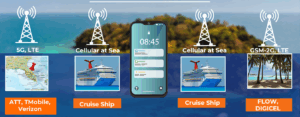
The Cruise Ship turns on its network, Cellular at Sea, when the ship is approximately 12 nautical miles out to sea from land. Likewise, the Cruise ship turns the network off approximately 12 nautical miles before reaching land.
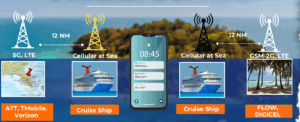
When you travel from land out to sea on the ship, and back to land, your phone will connect to the nearest available cellular network.
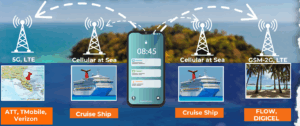
When your phone randomly connects to these different networks, expensive roaming charges will appear on your phone bill when you return from your trip. Some cellular providers (e.g. ATT, Verizon) offer cruise and international land use plans so you can use your phone on the ship and land without incurring roaming charges.
See this article for more specific information on what happens when you use your phone on a cruise ship, What to Expect on a Cruise: Using a Cell Phone.
2. Using Ship Wi-Fi on a Cruise
Wi-Fi service is provided over a network by using the signal transmitted by a router at or near a specific location (e.g. a hotel, cafe, cruise terminal). You may need a password and sometimes must pay to join a Wi-Fi network. When you are too far from the router, you won’t get the signal. You will need to join another Wi-Fi network at your new location.
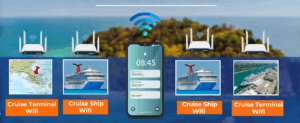
Most cruise ships have a Wi-Fi network which can be powered by satellite technology like Starlink. Cruise ships charge a fee to connect to ship Wi-Fi (some cruise ships offer limited Wi-Fi connectivity to use the ship’s app and messaging for free).
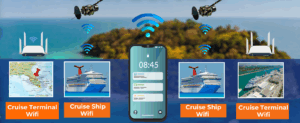
Ship Wi-Fi only works when you are on the ship. When you are on land, you need to find another Wi-Fi network or have an international phone plan from your cellular provider. Ask if the ship Wi-Fi works if your cruise ship stops at Cruise-owned ports (e.g. Royal Caribbean – Coco Cay).
3. Using e-SIM service on a Cruise
Your cell phone plan information is stored digitally on a small chip in your cell phone; this is an e-SIM. Your cellular provider tracks your cell phone usage, and you can manage your cell phone plan from your phone. E-SIM providers (e.g. Gigsky or Airalo) are essentially pre-paid phone plan providers.
The e-SIM provider sells a pre-paid cellular plan that you use by switching from your e-SIM to a different e-SIM.
What is an e-Sim Card & How Does it Work? | AT&T
As your phone connects to different cellular networks, you are using the e-SIM for your pre-paid plan and not incurring roaming charges from your usual plan provider. If you run out of data, you can pay additional money to add on to your plan. These charges can add up depending on how you use your phone.
Which one should I choose?
Here are some things to consider before you decide:
- How do you plan to use your phone while on a cruise?
- Do you plan to use your phone the same way you use it at home, or will you use it occasionally?
- Do you need phone service on the ship, on land, or both?
- Do you need to use GPS or be connected while on excursions (cellular access)?
- What will you use your phone for on the cruise?
- Is the reliability of service an issue?
- Will you use your phone for work? Checking emails?
- Will you stream video?
- How long will you be on the cruise?
Some cellular and e-SIM plans have limitations on the number of days/weeks that the plan can be used before it would need to be extended.
- Download speeds are always an issue.
Some cellular and e-SIM plans have limitations on the number of days/weeks that the plan can be used before it would need to be extended.
- Consider your itinerary
How many days will you be at sea and on land? Perhaps a land-only cellular plan will be cost-effective and meet your needs.
- Know your data usage habits
Internet browsing and streaming eats up data quickly, while with 1G of data you can send and receive about 10,000 emails (w/o attachments) or download about 200 photos or post about 2800 photos to social media or use map navigation for approximately 200 miles.
How do I cut down the cost of using my phone on a cruise?
- Cut down on data usage
Download videos onto your devices before your trip.
Disable data usage for any apps that you will not be using apps running on your device will suck up data
Low-data cellular plans tend to be less costly.
- Turn on Airplane Mode
Airplane mode blocks the cellular signal & avoids roaming charges. Turn on Airplane Mode if you use Wi-Fi or don’t have a cellular plan. If you have a cellular cruise plan (e.g. Verizon, ATT) or an e-SIM plan, you may need to turn airplane mode off to access the cellular network.
- Share the cost of using one phone on the cruise with another traveler.
Unplugging while on your cruise might be just what you need. If that’s not an option and you are traveling with more than one person, you can split the cost of one shared “connected” device.